




al-yeti
Trade Full Member
-
Joined
-
Last visited
Everything posted by al-yeti
-
Swb code name gorilla will be on scene soon be patient
-
-
Thought hold off was for tampers , just dis the bell trigger temporarily Or maybe there's an option for internal bells only on part set like a 9651
-
Does it have built in eol? Otherwise you need resistors, get all power correct and switch it on and hope for the best , and post the faults
-
Y not just connect and find out
-
You can buy them and install them, I thought they had a diy line? Just give them a quick ring and they will tell you what to go for Although pyronix I hear is easier for diy to get hold of etc
-
-
Yeah a few times
-
How many systems to get gorilla status?
-
I thought that but wondered how does the MSW integrate then? Apart from a firmware update ?
-
One day I might
-
Cover? Cable?
-
Maybe cos you hardcore gorilla
-
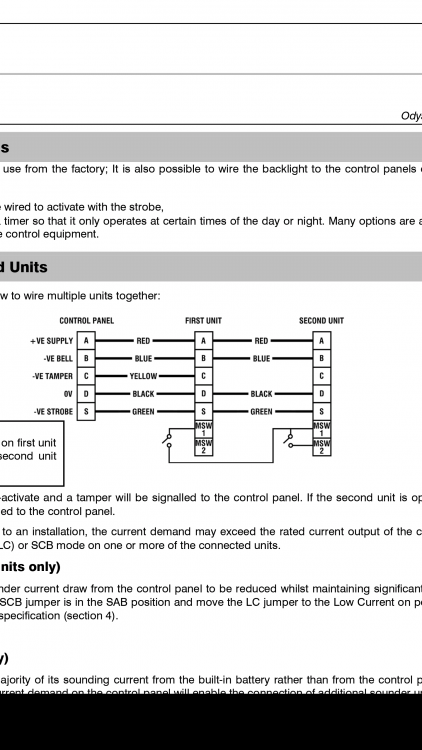
Maybe like this
-
For two bells tamper?
-
No one said connected MSW , what they for?
-
You need to connect the bell tamper , not omit it
-
What you in about dude? What you mean there's no bell tamper? In the bell or what your looking at on the panel
-
I notice this before some don't like being right next to the panel so move away if trying to register it near the panel, or call local gorilla
-
Always using gorilla tactics
-
I thought it was just me, problem with chrome keeps bringing old quote on some threads I thought it was just me, problem with chrome keeps bringing old quote on some threads I thought it was just me, problem with chrome keeps bringing old quote on some threads
-
Southallians
-
They did good job of stealing ideas though lol , no point designing or thinking if your own
-
6/14 with built in keypad will take 7ah?
-
Yeah that's him, his stuff should be good , go for the 44 instead